Category: Brands

Parent for Brands

  • D’Addario EFT15

    Acoustic Guitar Strings, flat tops, Phosphor Bronze, Extra Light

    According to the label. they have a warm, semi-bright tone. A semi-flat ultra smooth surface, perfect for slide playing, flat picking and recording, with reduced finger noise.

    Well the last part’s right, the finger noise is reduced from the beginning. First impressions on re-stringing them was that they were very bright. V.V. Bright Indeed. Any brighter and you could use them as fog lamps. But….

    I don’t think I’ve ever had a set of strings settle down quite so quickly. At the start, finger picking seemed to make the strings buzz, flat picking you could hear the noise of the pick on the string over the sound of the note. But I played them for several minutes (John Denvers’ Annies Song if you’re interested – because of the rapid chord changes) gave them their 4th stretch of the day and tried again.

    Now they resemble the blurb.

    They come in a phosphor bronze coloured pack, or as we say in England, Brown, wrapped in a plastic pouch with a number on it that you’re encouraged to enter into the D’Addario website Players Circle rewards program. Join this and you can send your strings back for recycling and gain extra (Brownie?) points. The strings aren’t individually wrapped but they are colour coded on the end of the string you stick in your guitars body. They’re coiled together in pairs, E-A, D-G, B-e. I’m not going to tell you how to restring a guitar; there’s enough tutorials out there to help you, though I’d suggest you learn the very simple Luthiers Knot and find a tutorial that shows you that if you don’t already know it. Also take the opportunity, with the strings off, to clean your guitar thoroughly.

    Give your strings a stretch: over the sound hole (or cone cover on a resonator) hook you’re forefinger under each string and pull up quite hard, the run the forefinger of your other hand from the neck to the highest fret, keeping in contact with the fretboard, 3 or 4 times.

    Retune

    Try to play. Note how you go out of tune very quickly. Repeat the stretch. try to play. About the 3rd time you’ll be able to play for a few minutes and after the 4th for a while longer. Keep your tuner to hand and, for this first day at least, keep stretching the strings. When that doesn’t change the tuning, you can stop stretching.

    Now you’ll also hear the strings as they’ll sound for some time to come. How much time? I’ll come back to this blog and let you know.

    Update

    It’s about 2 months since I strung my guitar with these strings. They’ve been played regularly, every day at home and for about 21 days (not in a row) in one of the most hostile environments known to half naked people – The Beach. 20mph winds, temperatures up to 26c, salt air and sand being blasted everywhere.,

    Despite this the strings maintained their tone and kept their tuning quite well – until this last week before writing this update. This week I’ve had to retune several times a day, and a day means 3 to 4 hours or constant playing. In a less hostile environment they don’t need retuning all that much. The sound has diminished but still isn’t bad. However I wouldn’t want to do a studio session with these strings as they are now.

    One other thing that I’ve noticed was that after a couple of weeks playing bends became radically easier. Although my previous strings were also lightweight it was never really possible to get much more than a half-tone bend, but with these I’ve managed close to, if not actually on, a full tone bend. Blues players might find that noteworthy.

    So, recommended usage.

    These strings will do quite well in a studio environment, especially if your guitar is left there for the whole session. you might want to think about replacing them after about 3 weeks, closer to 2 if you’re going to be doing a lot of overdubs on your previous recordings. You might be able to get 4 weeks out,

    Gigging constantly, maybe 3-4 weeks, depending on what sort of sound you want.

    A professional rehearsing for studio or tours, or maybe song-writing. 5-6 weeks, although you might still be happy with the sound at that point so stick with them until you aren’t. Change them a couple of days before any performance, but I shouldn’t need to tell you that 🙂

    Recreational player? You could get 6 to 9 months, maybe longer.

    Like all things the timings given above are just guidelines. You need to make your own mind up about the condition of your strings and whether you need new ones. The variables are how often and hard you play, how hot or humid it is, what type of music you play, finger or flat picking? I can’t tell you what will happen in your world, only what happened in mine.

    At the time of writing these could be bought for £23.99 with a RRP of £27.90
  • Admira Guitars

    Admira Guitars

    Admira Label

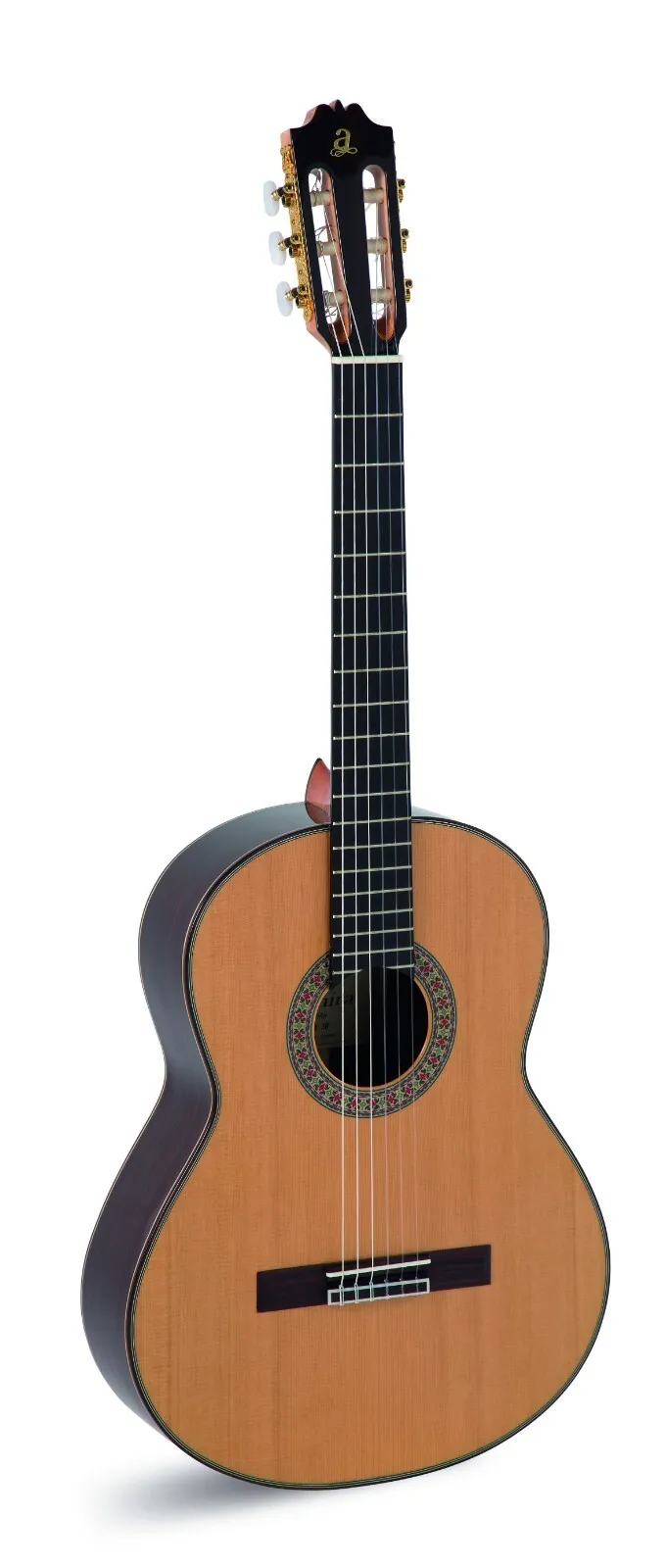
    He looked at me and said “You’re using harmonics?” I nodded. “I never thought of that. I’ve had it a few years and still can’t play. Take it, it’s yours”. That’s how I came to have a classical guitar that’s been in my possession for the last 30 odd years. It was an Admira and I found out a bit later that it would have cost him around £300.

    Recently I had the opportunity to play the latest model in that series and was excited to see if it had changed in anyway or had the same quality as mine

    If we start with the construction of mine, it’s made with the following materials

    • Top: Solid Cedar with a Satin finish.
    • Sides and Back: Rosewood with a Satin finish. Some listings mention Ovangkol, which is very similar to Rosewood in its tonal properties.
    • Neck: African Mahogany.
    • Fretboard: Mahogany.
    • Bridge: Mahogany.
    • Machine Heads: Nickel Lyre.

    These materials are chosen for their durability and contribution to the guitar’s tone and resonance. The combination of solid cedar and rosewood or ovangkol is typical for classical guitars, providing a warm, rich sound with ample volume and clarity. And 30 years later that’s still the case. It’s a beautiful instrument to play.

    But how does it compare to the A20 latest version?

    Well the construction materials are almost identical. The only difference is the newer model has an ebony fretboard and the whole thing costs more more than 4 times as much as the 1980s model at £1,290 on Amazon. That’s probably a great bargain considering how prices have risen in 30 years (a 50p pint of beer will now cost you £5.70). The sound though, well seriously it’s well named. You could pay £4,000 or more for a similar sounding guitar. It’s a joy to play. Your fingers just seem to find the right frets as if by magic, the tone can only be described as amazing and when you need to move your left hand rapidly from 1st to 3rd position your thumb slides up the neck as if it were oiled but never feels slippery. When you stop you feel secure in whatever position on the neck you happen to be. Harmonics just ring out loud and clear.

    If you want an instrument for fairly frequent performances but you don’t get paid top whack (yet), well this one will be a good investment.

    But what if you don’t have a spare £1,300 lying around or maybe you’re just starting out in classical guitar playing? Well first lets look a little at the company and ethos.

    Admira guitars are crafted with a blend of traditional Spanish guitar-making techniques and modern manufacturing systems. The process involves:The manufacturing workshops are based in Zarautz, northern Spain, where the guitars are produced to maintain the highest quality. The dedication to craftsmanship at Admira ensures that each guitar upholds the rich tradition of Spanish guitar making while incorporating modern elements for today’s musicians.

    • Selecting Woods: Admira guitars often use solid cedar for the top and Indian rosewood or mahogany for the back and sides, which are known for their tonal qualities and durability.
    • Handcrafting: While some processes are automated, the vast majority of each guitar is built and finished by hand by skilled craftsmen and women.
    • Neck Construction: The neck is typically made of mahogany with rosewood reinforcement, enhancing the instrument’s sturdiness and attractiveness.
    • Bridge: A rosewood bridge is used, aiding resonance, intonation, and tone.
    • Spanish Heel: The ARTESANÍA series, for example, is made with the union between the body and the neck of the guitar through the Spanish heel, a traditional method of construction.

    The manufacturing workshops are based in Zarautz, northern Spain, where the guitars are produced to maintain the highest quality. The dedication to craftsmanship at Admira ensures that each guitar upholds the rich tradition of Spanish guitar making while incorporating modern elements for today’s musicians.

    This applies pretty much to every guitar they make, no matter what the cost and they start at £123 for a full size guitar. It’s the Alba Student guitar. In this case, though, the word Student doesn’t apply to the musician but to the craftsperson who made it, under supervision of one of Admiras’ master luthiers. A rosewood back, sapele sides, pine top, mahogany neck means it[‘s suitable for a beginner

    Next up is the Malaga, made from spruce, mahogany and rosewood. This is a solid top guitar and you will be very hard pressed to find one of this quality and craftsmanship for £258. You’d probably get one of these, or the Concerto, when going for your grade 4 exams.

    Of course you could splash out a bit more and get the Concerto model. A cedar top and rosewood back. cedar body and mahogany neck give this guitar one of the best sounds at this price . £279

    But now we’re going to skip a few models and head to the £400 mark (£402 on the day of writing) with the A4. This instrument has a mahogany back and sides with a cedar top, mahogany with ebony reinforcements for the neck and kabakulli for the fretboard. `The neck joint is with the Spanish Heel technique, considered the most highly developed technique for this area. At this price range you’re getting serious about your guitar playing and this is an instrument that will back you all the way. an excellent sound. You just won’t get a much better guitar at this price. You’re also unlikely to get one that’s all solid wood, and it will last.

    Our last look on this visit was at the A45. This model is part of Admira’s ARTESANÍA series, which is crafted by skilled luthiers using traditional handcrafting methods to produce guitars with exceptional tone, clarity, and expression. This series represents the crown jewel of Admira’s offerings, blending top-quality materials with passionate craftsmanship. You can guess that just as the materials are superior, so is the tone and the sheer playability of this guitar. If you’re doing your B. Mus. and focussing on classical guitar this model would be up there on my list of ones to buy. £649 at the time of writing

    Disclaimer: Admira didn’t pay us, or ask us to write this review. We just happen to be very impressed by their guitars. But if you do buy from Amazon we’ll get a small commission.

  • iRig Blueturn

    iRig Blueturn

    A very simple idea to deal with a very awkward problem: I’ve got my music on a tablet but I’ve got to the bottom of the first of four pages. Now what? How do I turn the page when both my hands are on my instrument? Well not being Zaphod Beeblebrox* and not wishing to employ someone to lean over my shoulder or sit on the floor to push the button or swipe right I need a solution. Technical, not liquid (that comes later.) Well, the folk at IK Multimedia came up with a solution. Say Hello to your onstage companion for the duration of this concert, the iRig Blueturn.

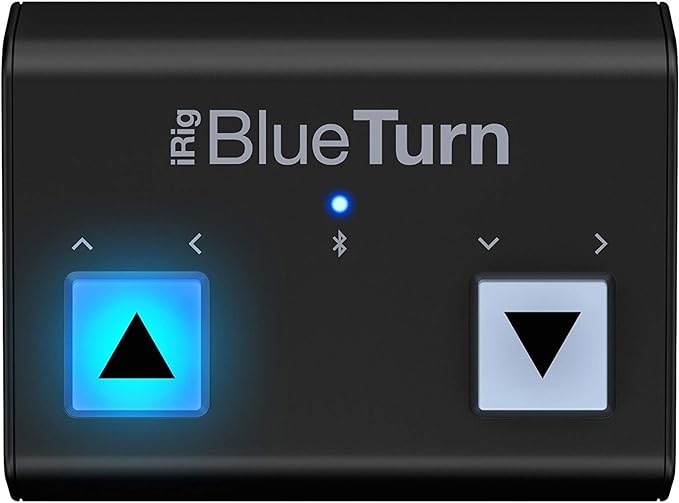
    The dimensions of this piece of kit are 18.42 x 41.28 x 5.72 cm; and it weighs in at 119.07gms. It does need a couple of AAA batteries and to get you started there’s some in the box. Once you put those in you’ll notice the on-off switch underneath. That, and the two big white buttons (BWB) on the top are the only controls on the device. Do I need to tell you that the white ones are for your foot to stamp on though you’ll need to use your hands the first time you switch it on.

    Switch it on. Well actually, don’t. you see this device has a few Modes that you need to understand before you do and you have an important decision to make. OK, now you know you have to decide we can turn it on. As this is your first time hold one of the BWBs down THEN turn it on. The BWBs will flash alternately. Now, pressing the Left button will put the device into Mode 1 and, obviously, the Right will put it into Mode 2. Pressing the Left and Right together will put you into Mode 3. So what are these modes?

    Please make sure you have the up arrow foot switch on the left. Results can be unpredictable if you don’t

    The manual says Mode 1 is the most common for IOS and Android devices. Well maybe. Possibly if you’re using the Irig Stage app. This mode is the Up Arrow foot switch is like pressing the Up Arrow on your keyboard and the Down Arrow is Down. With me so far?

    If you go for Mode 2 the Up Arrow switch represent Page Up and the Down Arrow is Page Down . This is the one that works on my Android tablet but I suppose it depends on what you want the device to do as to which mode you end up choosing. Personally I would think that maybe Page Up/Down is what you might want the thing to do but you’ll need to experiment and see if the manual is right.

    Mode 3: the Left (Up Arrow) switch sends a Left Arrow command and so, quite naturally, the Right (down arrow) represents a Right Arrow command.

    Now you see why the original device orientation is important, and why, when you set out your stall, is important when in use. To help you, if the logo “BlueTurn” is upside down, so is the device.

    You’re not out of the woods yet because you still have to pair it with your device. However, that bit is dead easy. Go to you Settings > Bluetooth section and you should see it there in Other Devices, or similar grouping, where you can select it to pair. No codes need to be entered to complete the paring.

    In use, it works well and does exactly what it’s supposed to do. One caveat though. I’ve found that in direct on sunlight, even in the cold Summer days we have here in the UK (it’s mid-June as I write and the temperature is 16C) the device can stop working. Sometimes.

    At the time of writing the RRP is £79.99 but you can get it at Amazon for £74.16, or Thomonn for £66.

    *For those Earthlings not familiar with the Hitch Hikers Guide to the Galaxy, Zaphod Beeblebrox, President of said Galaxy, had a third arm fitted to help him with his ski-boxing.

  • Roadie 3

    Roadie 3

    I’ll be good, I promise, and try to avoid jokes about wind-up merchants, but I don’t promise nuffink. After all this is about a product whose whole purpose is winding things up. Well, strings anyway. On banjos, guitars, mandolins and ukuleles with breakdowns for different types of those instruments, And as if that wasn’t enough you can add in your own custom instruments and your own custom tunings. There’s 150 built-in tunings, yet you want more? Who do you think you are, Joni Mitchell?

    Ok, so there’s an obvious difference between this string winder and many others out there. This one “knows” what the string you’ve attached it to should sound like and it will stop when it gets there. If it goes a bit past it, it will retune slightly until it’s right on. You can watch the progress on the built- in screen. when the tuning is right this winder give a little self-satisfied beep, which winds you up as well.

    Oh, and it can also act as a metronome.

    I tried it out on a number of instruments – a classical guitar, recently restrung, a Yamaha acoustic in standard tuning, a Fender acoustic in Open D. a Fender Telecaster, a Gretsch resonator (steel guitar) and a mandolin. This model doesn’t handle bass guitars.

    roadie 3 case

    One word of warning. When you’re unpacking this device the cardboard moulded to the shape of the gadget fits the gadget OK, but doesn’t fit the box it comes in. It’s theoretically glued to the box but in my case this had come away. This may have happened in transit as a result of being shaken for some time, but still, be careful. This isn’t a cheap device and if you insist on dropping it on things, try to make sure they’re padded.

    Given that this device is also marketed as being useful to people “on the road” soft cover would be useful to prevent damage, especially considering the price. You can buy a hard case for it. RRP £29

    This comes with an app to download. Do so and use it. You can enter your instruments and enter their names and all details one letter at a time,. scrolling through the alphabet, but even Stephen Hawking found a better way than that. Use the app. it will save your sanity. Because….. you can do things on the app you can’t do on the device, like picking the tuning you want.

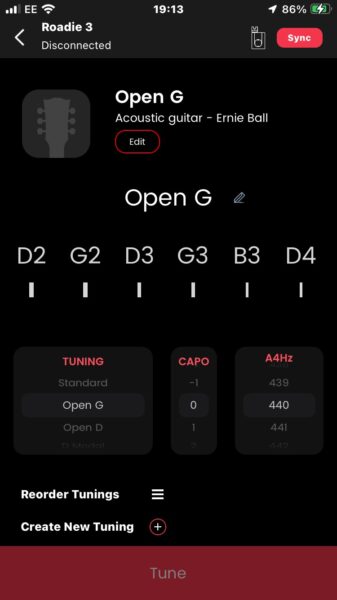
    What you’ve got here is a screenshot showing what you get when you select an instrument in the app. You get shown what each string will get tuned to, you can change the tuning in that little box marked Tuning (swipe up or down), and you’ll have noticed the really clever bit. You can set this up so that you can stick a capo on, say, the 3rd fret and have the winder get you the right tuning, so you’re not in Open G but B-flat.

    Roadie 3 screenshot

    So what’s it like to use? Well there’s a fair bit of torque in the motor so you have to keep a pretty strong grip on it. It’s also quick, apparently a lot quicker than it’s predecessor (so I’m told) and a lot quicker than other powered winders I’ve used. You do also have to keep plucking the string you’re tuning. It won’t do anything unless you do that. It doesn’t ‘listen’ to the note using a mic but instead relies on the vibrations from the string. useful in noisy environments, and essential for tuning an electric guitar. Yes, they actually don’t need to be plugged in to anything, you just tune them like an acoustic.

    It can be a bit awkward if you’ve got the guitar resting on your knee. it’s better if you can place the guitar on a rest or something that allows you access to the headstock. Otherwise you’re likely to brush the control button and maybe stop the tuning process. That means starting again. You can just pick one string, useful if you’re replacing a string on stage, but if you’ve just got to the G string it’s quicker to start again rather than select three strings manually.

    When you’ve tuned all the strings, start again anyway. Changing ther tension in any string can change the torsion in the neck and affect the tuning of strings you’ve already tuned. It’s not the device’s fault, you just can’t beat Physics. There’s also a setting called Accuracy: you can set it to Fast or High Accuracy. In a quiet room it didn’t seem to make much difference.

    It tuned the mandolin in under two minutes and each string was exactly the same as its twin. Three guitars were tuned in under five minutes. The classical guitar had just been restrung and the strings were slack. it took just a few seconds to go from slack to tuned. The electric guitar was tuned to perfection in under 20 seconds, the Yamaha in 30 seconds. It struggled a little with the resonator though but just on the top E string. That took close to a minute., but this may be because I hadn’t selected the “correct” option for the type of guitar. My three options were Lap Steel, Dobro round neck or Custom. I chose the last, maybe I should have chosen one of the others. After all this device is all about good vibrations and a resonator has a lot of those.

    If all else fails there’s a manual tuning option, just like the various tuning apps you can get for your phone.

    You can use this device to take a string off your instrument, and restring it using the WInder mode, which has 3 paces. You can unwind fas, put the new string on select the string note that you’re changing, press and hold the button and that 120RPM motor will whizz it up for you you and stop at the right note. In theory. It can be a little precious in doing that.

    The battery is supposed to be able to handle 150 strings being tuned before it needs a recharge (USB-C cable supplied).

    The claim is made that if your instrument has geared pegs then this device can tune it, so if you play the violin or viola you’re out of luck. Maybe. You probably have a violin which relies on friction to keep it in tune, you know, pull, tune, push, check. Swear. Start again. For. Each. String! Or you could buy a set of geared pegs. These will set you back anything from just under a tenner to £200 for a set. Now this gadget will work for you as well.

    This is an impressive little device (it’s smaller than the palm of my hand, but I have reasonably large hands (stretching to 10 white notes on the piano – not up there with Liszt or Poulenc but not baby paws). First contact, it feels like it’s worth the £129 RRP (£107.50 at the time of writing). If you’re playing regularly on stage and under lights it might well be worth having one to give your axe a quick sharpening when you feel it’s needed. Get one for your roadie. For me, i do most of my playing these days on the beach, in the hot sun where sometimes you can hear the tuning drift during the course of a single song. It’s going to get a work out over the summer, so I’ll come back and give an update after I’ve used it in anger.

    I also think I kept my promise and avoided obvious puns. Don’t expect that to happen again.

    3 Month Update

    It’s not totally happy down at the beach. for some reason it doesn’t seem to like the wind and ends up winding up and down past the note several times before deciding it’s OK, then you play a chord and find 2 or 3 notes are out. Or it decides that what you really, really wanted to do was unwind that string, not tune it up. Nothing you can do will stop it except to turn it off, manually retune the string a bit and try again. Is it the noise? Because if it is I’d have difficulty recommending one for gigging. It’s not every time but it’s happened to me three times so far, once at home twice by the sea. Could just be a glitch. If you’ve got one and have anything to add please leave a review

    Knilling Perfection Planetary Pegs, Violin £99

    Wittner Medium FInetune Violin Peg £69

    Toyandona Geared Pegs for Violin £30

    Roadie 3 at Amazon

    Roadie 3 case at Amazon

    Roadie Bass Tuner at Amazon

  • Sibelius

    Sibelius

    This a renowned music notation software that has been widely used by composers, musicians, and educators. It’s now a subscription service so you may wish to think about that before buying because this could turn out to be quite expensive. There are several variants. Sibelius First (free to get) gives you just 4 staves to work with. Sibelius Artist (£89 p.a.) gives you 16 and Sibelius Ultimate (£169 p.a.) gives you unlimited staves. In addition you can only work with 16 instruments on the 1st two offerings. Monthly subscriptions are available. You pay more for them.

    Installation was a bit odd. Several times in quick succession what I think would be the terminal command box flickered on and off. This usually happens with much older installation routines (say more than 20 years old) and occurs when device drivers are being installed. Its not harmful to your PC but can be disconcerting. The age of the installation routine can also be seen in that it offers you the option to view the Windows Install Log. MacOS versions are available.

    Sibelius appears to be designed to work with Pro Tools. You can cut and past MIDI between the two. Avid owns both Sibelius and Pro-Tools so this shouldn’t be a surprise. If you want to use other DAWs you’re going to have to import and export MusicXML files. For now. Some software houses are working on ways of duplicating the cut and paste functionality.

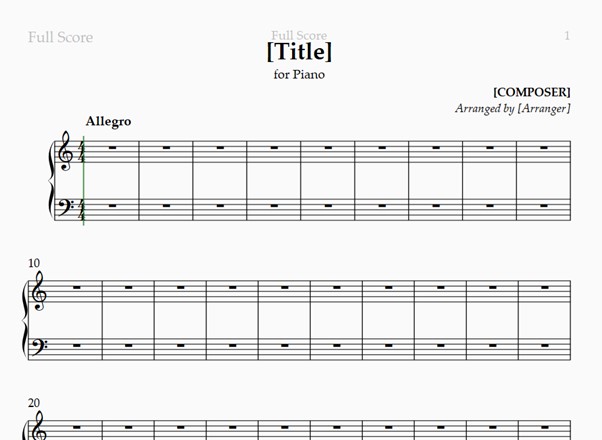
    Creating a new score enables you to choose from a number of templates which includes Piano Quintets and Marching Bands. Or Just start from a blank page. Choosing Piano Solo brought up a number of options which included a ‘House Style’ with selections such as Handwritten or Jazz Reprise. You can also change instruments here and select Harpsichord or Great Organ. There are other options but they’re pretty intuitive such as time signature, tempo etc.

    sibelius 1

    Just fill in the blanks ?

    Which you do by going to the Score Info. Don’t worry, click on something like the word Composer and you’ll get an option to take you there.

    There’s a floating ‘Keypad’ where you can select items for copying to your score, or you can create a scale just by typing the letters CDEFG etc. Sibelius will put them on the stave for you. In addition hover your mouse over where you would want to put a not and a grey version will appear. Click to insert it.

    Of course this isn’t the only way of composing. Sibelius can take a MIDI file and convert it to a score. You can also export the score you’ve created to a variety of formats. You don’t have to wait to hear just how amazing your composition is. There are many MIDI instruments available so you can listen immediately from the Play menu option. If you just happen to have a MIDI keyboard (or MIDI Guitar) you can use that to help compose your masterpiece as well.

    Caveat Emptor! If you don’t know much about musical notation then this product probably is not for you. It’s definitely aimed at trained musicians and even then some may struggle with this product. But like anything else experience counts and you’ll find it easier as you go on.

    On the plus side this will help you polish to your score prior to publication and since you can export to a PDF

    If composing, editing or arranging is what you do for a living then this will do well for you. If you’re a music student there are education editions on offer.

  • AnthemScore

    AnthemScore

    AnthemScore is specialized software designed for automatic music transcription. It’s developed by Lunaverus and has been recognized for its ability to convert audio files into sheet music or guitar tabs with impressive accuracy. It does make some mistakes though, which is why you will probably also need to get hold of score editing software. Depending on which version you buy, 2 of the 3 have a built in editor.

    It’s not a subscription model of purchase, you simply buy it. AnthemScore Lite costs £25.59 and the Professional version retails at £34.32. Both of these come with one year of updates. Then there’s the Studio version which costs £87.36 and comes with a lifetime of free updates. That can be very cost effective. The Lite version has no editor.

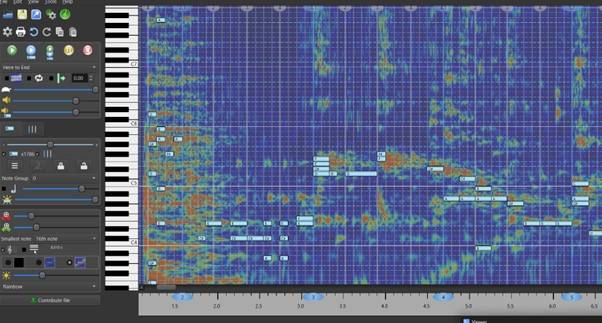
    So what does it actually do? You can feed a WAV or MP3 file into it which will turned into, for example, a piano reduction of the track you’ve loaded. First it will do the AI analysis and you’ll get a screen that looks like the featured image. Very quickly though, it will be followed by this:-

    anthemscore 2

    There’s a MIDI play back available. and you can have it transcribed into a range of instruments such as Guitar, Violin, Cello, Harp, Bassoon, Sax or Concert Ukulele. Yes, really!

    In the Edit > Sheet Music settings you can set the guitar output to be in tabs and even select what type of instrument does the MIDI playback.

    This particular version, by the Wiener Philharmoniker, has a choral part added, hence that odd high note which you might want to edit out. You can either use the built in editor (beyond the scope of this review) or export the project as a MusicXML file. Actually you can export it in a number of formats, such as PDF or MIDI or a CSV containing Beat and Note data or the Spectrogram Amplitudes.

    It does have some weaknesses. In trying to transcribe a pieces of music that had a mandolin playing, the output score doubled up many of the notes. You can understand why that might happen (it would probably do the same for a bazouki or twelve string guitar) so if you want to transcribe music from those twin stringed instruments you’ll definitely need to either buy a copy with a built in editor or get hold of some music editing software like Sibelius or MuseScore.

    Some have criticised the license management module but we found no real issues with it. There are, after all, quite a few bits of software that open up new functionality after entering a license key, especially in WordPress website plug-ins.

    Why would you buy this? Well if you have a pressing need to create piano reductions of orchestral music, perhaps because you’ve got a dance school and you want the music for the pianist, you’d certainly want this pieces of software. Other options are for instrumentalists wanting to get hold of some sheet music, or guitar tabs, for a piece that might be hard to get hold of, well, look into this software. if you do a lot of that then even the most expensive purchase option will be cost effective. This is a very powerful tool indeed.

  • Presonus Faderport 8

    Presonus Faderport 8

    As soon as I saw this device it got filed in the category of “I want One of Those”. Ok, I had been looking for something like this but one specific requirement always seemed to be missing. I mean is it too much to ask that a mixing desk should behave like the ones you see on TV, so the sliders and things change on playback in accordance to the way you changed them when you made the recording, or have set the dynamics since recording? I can think of nothing more frustrating than seeing the representation of the slider on your DAW sitting around the zero point while your physical slider is down the bottom at -60. Enter Stage Right, the PF-8.

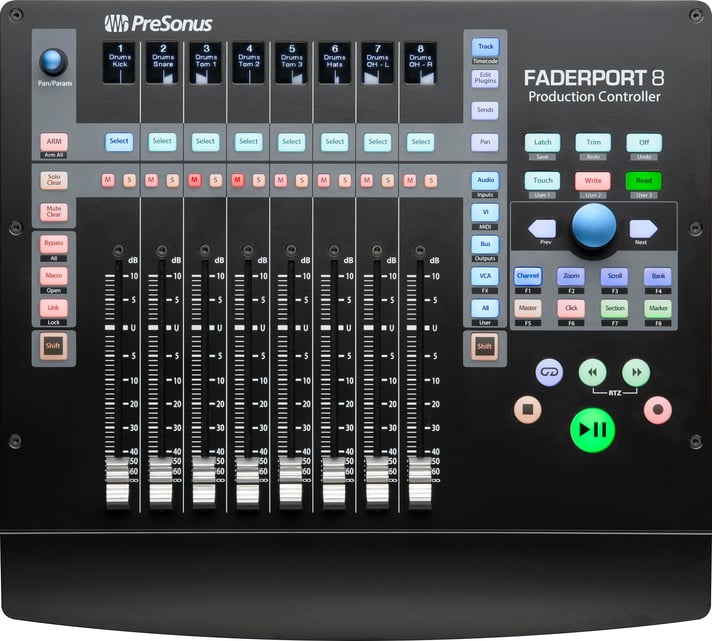
    As the name (and pic) suggest, this has 8 sliders (there is a 16 slider version if you want) and guess what, these are motorised! That means they move up and down all on their own. There are also two knobs and loads of buttons as well as 8 scribble strips – lcd displays so you know what instrument is playing or whether some of those sliders are showing your output channels.

    So what will it work with? At the top are 8 buttons marked Select. Hold the first two down and power on the device. Six of the strips will light up and show you Studio One, MCU, HUI, Midi Mode, Setup and Exit/Restart. Studio One Artist, Abletron Live Lite and Studio Magic software is included and it will also work with the grown up versions of those. The MCU and HUI support means it will work with Logic Pro, CuBase, Pro Tools and any other DAW that use those protocols. Indeed, if you go setup and select the MCU option a second list appears with buttons for Logic Pro, Cubase, Sonar and Abletron.
    OK, I know, you’ve got way more than 8 channels. There’s a knob for that.
    Lets look at what Presonus say it can do.

    • Complete recording-transport controls: Play, Stop, Fast Forward, Rewind, Record, Loop, Drop Marker Next / Prev Marker Next / Prev Event
    • General session controls: Undo / Redo, All Arm, Solo / Mute Clear, Track Management, Click On / Off with tap tempo
    • Session Navigator provides quick control over track scrolling, channel banking, timeline scrolling, and much more
    • Channel controls: Level, Pan, Solo, Mute, Rec Arm
    • Automation controls: Touch, Latch, Trim, Write, Read, Off
      Optional Fader functionality: plug-in edit, bus sends, pan
    • Footswitch input for hands-free start / stop
    • USB 2.0 connectivity

    There’s a lot in there to get to grips with but the Session Navigator knob is the one that will allow you to scroll left ot right channel by channel, or the Prev/Next buttons either side can move you 8 channels at a time. Underneath the select are the Mute and Solo buttons, transport and automation controls on the right.
    Depending on your software panning information will be shown slightly differently. Studio One shows <L><C><R> while Logic Pro shows plus or minus with a number to show how far in that direction. I haven’t tried it with other DAWS sow can’t say.
    Panning is really my only beef with this device. To use the knob you have to select a channel and then use the panning knob (top left) to set or change that. Or perhaps you’d prefer to push the button marked Panthat allows you to use the slider to change the panning on several channels at once rather than one at a time.
    One other thing, if you’ve got plugins set up on your channels like Compression, Reverb etc, there’s a button right beside the F on the Faderport logo that, if you press it, allows you to control the plugin settings from the sliders. Using that knob and the sliders. As cool as a penguin in a tuxedo playing jazz piano in a cocktail bar in the Antarctic.
    So why did I want one? Why do you want one? Go have another look at your DAW. How many of those sliders can you change the volume on at the same time just using your mouse. One, right? Now, when I record an electric guitar playing I set a mike in front of the speaker, then split the signal from the guitar, DI to the DAW, and take the other line to the amp and take the output from the amp to the DAW, so I have 3 channels for that one instrument. On mixing I might want to take the volumes down all at the same time, or vary the mix between the 3. You can’t do that with a mouse. If you’re good (and I’ve worked with some very good sound engineers) you can use all eight of your fingers (thumbs don’t count) simultaneously to craft your production. OK, you can stack your tracks but that just kicks the can down the road. With the Faderport you can mix percussion, vocals, guitars, keyboards ALL at the same time and without having to change your pointers focus.
    At the time of writing you can get this from the Presonus store on Amazon for £396.

    What happens when you load a project that has they dynamics already set up?

    There’s a 16 port version as well.

  • Magnetic Pencil Holder

    Magnetic Pencil Holder

    OK, here’s the scene. You’re playing in an orchestra, you’re at rehearsals and the conductor wants to make some changes to your score. You had a pencil on your music stand but the vibrations from the kettle drums has jiggled it off the stand, heading at speed towards the 1st violins and off the edge of the dais stair you’re sat on. You’ve got another one in your bag, but that’s under your chair and not easy to get to. Happened all the time to me. I’ve played with some very noisy outfits.

    Well the good folks at Konig and Meyer have got yet another great idea up their sleeve. So long as your stand is made with iron, steel or cobalt (yes really, but I’ve yet to see one made of that material) they’ve got a great little magnetic pencil holder that will save your face from going red either from embarrassment or the effort in trying to retrieve your bag from under your chair where, somehow, its straps have become completely entangled with the legs, looking like some sort of manic, musical Gordian Knot. And you weren’t allowed to bring your sword in because of some arcane Health and Safety rule.

    bm16099

  • Konig & Meyer Adjustable Music Stand

    Konig & Meyer Adjustable Music Stand

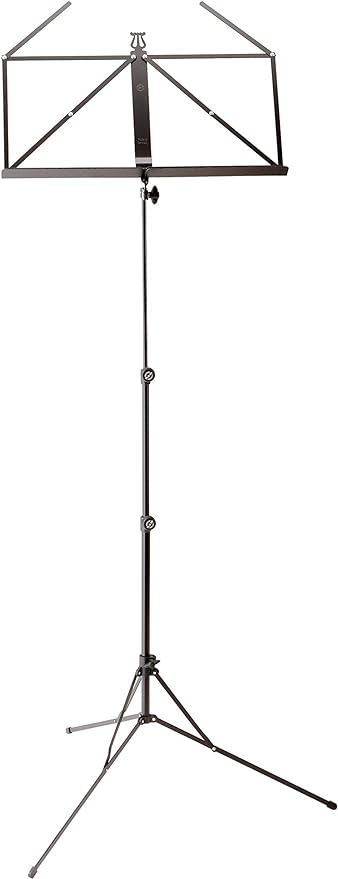
    One thing that a lot of people make a mistake about are music stands. There are two types: cheap ones and more expensive ones. The main difference is you’ll buy a lot more cheap ones than dear ones because the cheap ones will fail quickly, often when it’s least convenient, while the dear ones will give you 4 or 5 years of reliable service. Why is this reliability important? Well, you don’t want to be giving a performance somewhere and watch your music sink to the level of your ankles. It’s not just embarrassing, it makes the music hard to play as well.

    These Konig and Meyers are some of the best stands you can get and, not surprisingly are also best sellers. Your Reviewer has worked in music retail for decades and can count the number of returns for this product, the K&M 101, on one hand. The actual number of sales exceeds the number of fingers on your Reviewers hands by quite a large margin. Polydactyly is not involved. The 3-piece design folds down into a neat, portable box and at around 1kg in weight, it isn’t too heavy. Think of a litre of milk. Doesn’t come with a bag, but you can’t have everything! However, for a price….. Available in black or nickel , or you can have the stand and a matching bag. At the time of writing the stands cost under £25, the bags 7 or 8 quid.

    Think of it as an investment in face-saving.

    The Stand In Black

    The Stand In Nickel

    The Stand with Matching Bag

    The Bag

  • My First Classical Book

    My First Classical Book

    Aimed at introducing young children to classical music with information about the composers and their works as well as instruments of the orchestra. Shame it only comes with a CD rather than audio access. Nonetheless with music ranging from Mozarts’ Magic Flute to Williams’ Harry Potter and the Philosopher’s Stone there’s a range of music worth listening to even if you’re a kid of 40. Learn about the different instrument groups and how the play together – nicely for the most part.

The Music Realm
Privacy Overview

This website uses cookies so that we can provide you with the best user experience possible. Cookie information is stored in your browser and performs functions such as recognising you when you return to our website and helping our team to understand which sections of the website you find most interesting and useful.