Category: Studio Recording

Studio Recording for Home or Professional studio recording environments

  • Komplete Audio 6 Mk2

    Komplete Audio 6 Mk2

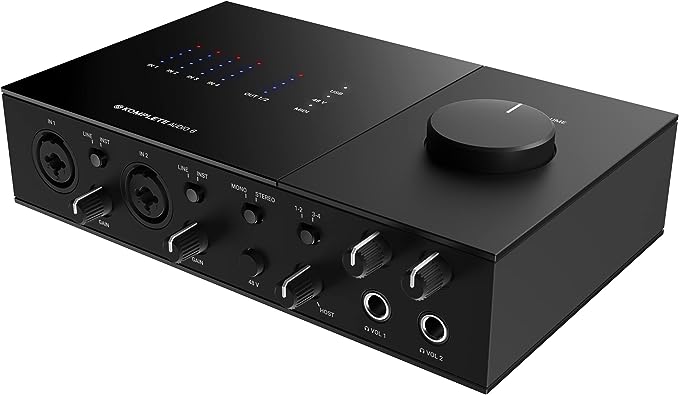
    Well, what a surprise, although I suppose it shouldn’t really be one. This is a radically different animal to the Mk-1. The most noticeable difference (apart from the black colour) is that instead of a series of LED telling you a port is active you’ve got a display that shows you the output level on the ports you’re using. With respect to those, you’ve got the same number and configuration (though in a different layout) to the earlier model and that’s 4 analogue and 2 digital inputs, the last two you can switch to output. 2 of the analogue ports have their own gain control. Those are the ones that can also accept XLR connections. There are also 4 analogue output ports, 2 headphone ports (with vol. controls) and MIDI in and out. Two of the analogue in ports can either be standard 4.5mm mono jacks from your instrument, or XLR from microphones, and a 45v phantom power switch if your microphone needs it.

    There’s a big master volume control on the top.

    The whole thing connects to your PC with a USB-2 which is a bit disappointing. USB 2.0 is a little slow in data connection terms and since USB-C has been around for some time now and with both Windows and Mac support for that I would have thought this would have that connectivity. It does support recording up to 192 kHz at 24 bits but I suspect that if you’ve got 6 instruments plugged in to, as suggested by some of their ‘scenarios’ it might just struggle a bit.

    The build quality is very good, like it’s predecessor, and like that it won’t go sliding around on a desk. Despite being USB powered the audio quality is excellent, the preamps are very good and the sound is clean and clear.

    There’s a comprehensive bundle of 9 software items and a voucher to use in the Native Instrument shop. I’ve always got mixed feelings about bundles, regardless of what you’re buying. This one includes Abletron Live Lite so if you don’t already have a DAW you can still start recording immediately. Otherwise much of what this software bundle supplies will probably be found in a plugin in your DAW and you’ll be much better off using that.

    I’ve tested this with Logic Pro, Pro Tools and Studio One and it works well with those. It should work with most others as well, but you may need to install drivers for WIndows.

    At the time of writing the list price was £189 but you could get this on Amazon for £133.

    For this price it’s a very good acquisition, and several manufacturers are selling devices with only 2 inputs for more than Amazons sale price. but do ask yourself first if you need to be able to input from 6 sources simultaneously. Maybe a two or 4 port device would suit you better and the Komplete Audio 1 goes for around £50. Nonetheless this is a solid buy for your recording setup.
  • Presonus Faderport 8

    Presonus Faderport 8

    As soon as I saw this device it got filed in the category of “I want One of Those”. Ok, I had been looking for something like this but one specific requirement always seemed to be missing. I mean is it too much to ask that a mixing desk should behave like the ones you see on TV, so the sliders and things change on playback in accordance to the way you changed them when you made the recording, or have set the dynamics since recording? I can think of nothing more frustrating than seeing the representation of the slider on your DAW sitting around the zero point while your physical slider is down the bottom at -60. Enter Stage Right, the PF-8.

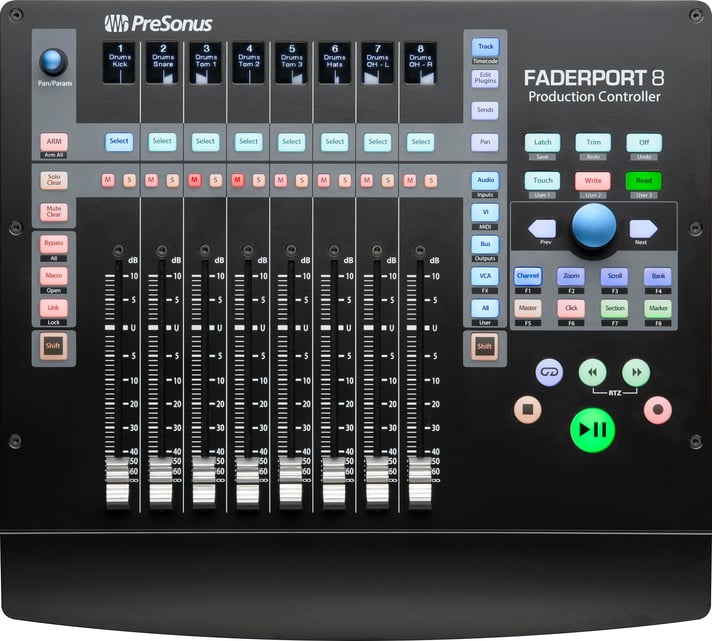
    As the name (and pic) suggest, this has 8 sliders (there is a 16 slider version if you want) and guess what, these are motorised! That means they move up and down all on their own. There are also two knobs and loads of buttons as well as 8 scribble strips – lcd displays so you know what instrument is playing or whether some of those sliders are showing your output channels.

    So what will it work with? At the top are 8 buttons marked Select. Hold the first two down and power on the device. Six of the strips will light up and show you Studio One, MCU, HUI, Midi Mode, Setup and Exit/Restart. Studio One Artist, Abletron Live Lite and Studio Magic software is included and it will also work with the grown up versions of those. The MCU and HUI support means it will work with Logic Pro, CuBase, Pro Tools and any other DAW that use those protocols. Indeed, if you go setup and select the MCU option a second list appears with buttons for Logic Pro, Cubase, Sonar and Abletron.
    OK, I know, you’ve got way more than 8 channels. There’s a knob for that.
    Lets look at what Presonus say it can do.

    • Complete recording-transport controls: Play, Stop, Fast Forward, Rewind, Record, Loop, Drop Marker Next / Prev Marker Next / Prev Event
    • General session controls: Undo / Redo, All Arm, Solo / Mute Clear, Track Management, Click On / Off with tap tempo
    • Session Navigator provides quick control over track scrolling, channel banking, timeline scrolling, and much more
    • Channel controls: Level, Pan, Solo, Mute, Rec Arm
    • Automation controls: Touch, Latch, Trim, Write, Read, Off
      Optional Fader functionality: plug-in edit, bus sends, pan
    • Footswitch input for hands-free start / stop
    • USB 2.0 connectivity

    There’s a lot in there to get to grips with but the Session Navigator knob is the one that will allow you to scroll left ot right channel by channel, or the Prev/Next buttons either side can move you 8 channels at a time. Underneath the select are the Mute and Solo buttons, transport and automation controls on the right.
    Depending on your software panning information will be shown slightly differently. Studio One shows <L><C><R> while Logic Pro shows plus or minus with a number to show how far in that direction. I haven’t tried it with other DAWS sow can’t say.
    Panning is really my only beef with this device. To use the knob you have to select a channel and then use the panning knob (top left) to set or change that. Or perhaps you’d prefer to push the button marked Panthat allows you to use the slider to change the panning on several channels at once rather than one at a time.
    One other thing, if you’ve got plugins set up on your channels like Compression, Reverb etc, there’s a button right beside the F on the Faderport logo that, if you press it, allows you to control the plugin settings from the sliders. Using that knob and the sliders. As cool as a penguin in a tuxedo playing jazz piano in a cocktail bar in the Antarctic.
    So why did I want one? Why do you want one? Go have another look at your DAW. How many of those sliders can you change the volume on at the same time just using your mouse. One, right? Now, when I record an electric guitar playing I set a mike in front of the speaker, then split the signal from the guitar, DI to the DAW, and take the other line to the amp and take the output from the amp to the DAW, so I have 3 channels for that one instrument. On mixing I might want to take the volumes down all at the same time, or vary the mix between the 3. You can’t do that with a mouse. If you’re good (and I’ve worked with some very good sound engineers) you can use all eight of your fingers (thumbs don’t count) simultaneously to craft your production. OK, you can stack your tracks but that just kicks the can down the road. With the Faderport you can mix percussion, vocals, guitars, keyboards ALL at the same time and without having to change your pointers focus.
    At the time of writing you can get this from the Presonus store on Amazon for £396.

    What happens when you load a project that has they dynamics already set up?

    There’s a 16 port version as well.

The Music Realm
Privacy Overview

This website uses cookies so that we can provide you with the best user experience possible. Cookie information is stored in your browser and performs functions such as recognising you when you return to our website and helping our team to understand which sections of the website you find most interesting and useful.